NextDash Order Management Dashboard for WooCommerce
How NextDash's order dashboard replaces WooCommerce's plain orders table with search, filtering, and status tracking.
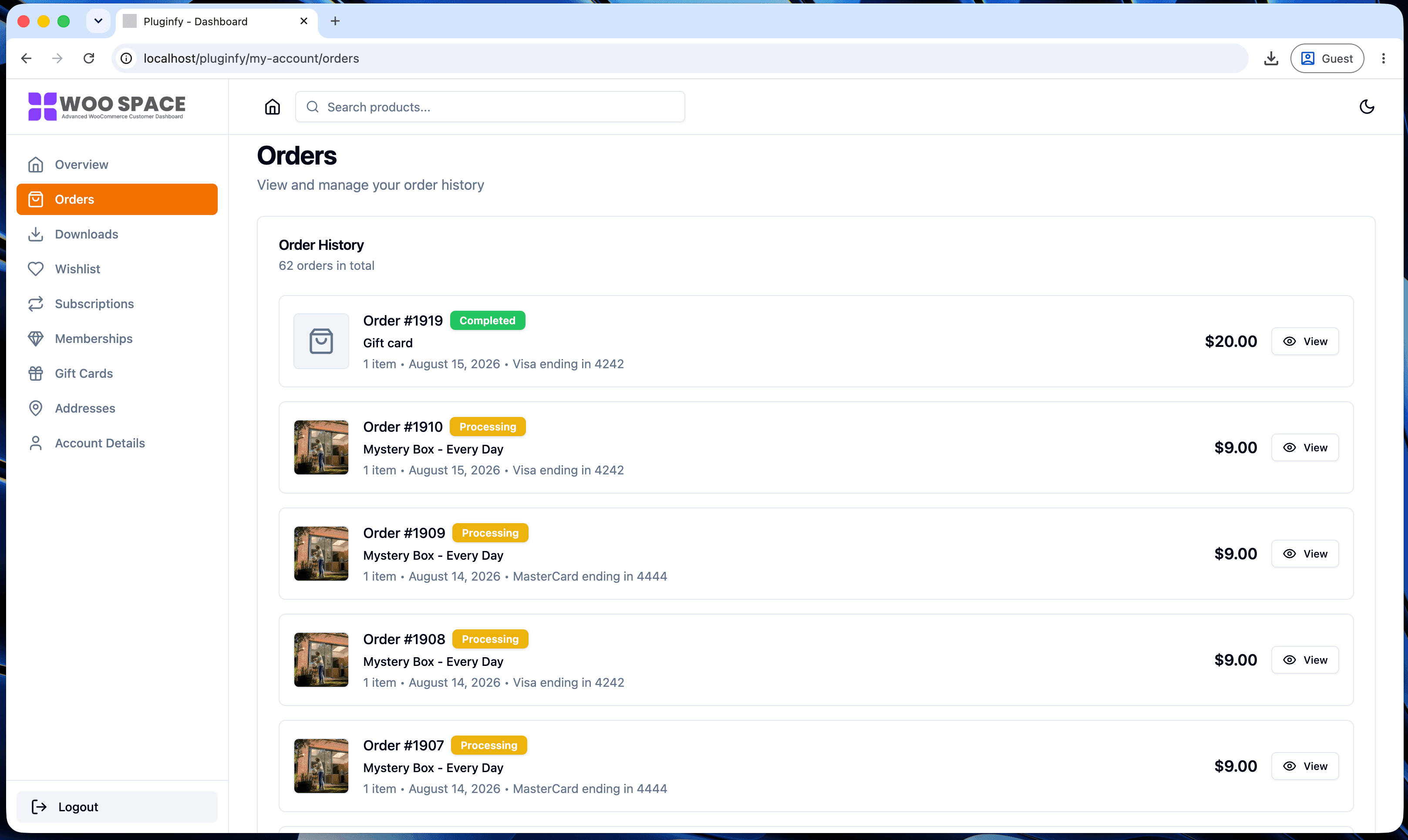
Orders is the tab customers visit most - checking status, finding an invoice, reordering something they bought before. It's also the tab where the default WooCommerce experience shows its age most clearly. Here's what NextDash's order dashboard actually adds, specifically.
The default WooCommerce orders tab, and its limits
WooCommerce's stock orders tab is a plain HTML table: order number, date, status (as text), total, and an action link - paginated, with no search and no way to filter by status. Finding a specific order from six months ago means paging backward through every order in between, or scanning a long list by eye. It works, but it's a 2012-era table doing a job that's grown more demanding as stores accumulate order history.
What NextDash's order dashboard adds
- Search - find an order by number or product name instantly, instead of paging through history
- Status filtering - view just "Processing," just "Completed," or just "Refunded" orders without scanning the full list
- Card-based layout - each order shows status as a visual badge (color-coded), items, and payment method at a glance, not buried in a table row
- One-click actions - reorder or view an invoice directly from the card, without navigating to a separate page first
How order status and tracking are surfaced without extra plugins
Status is visible immediately as a colored badge on each order card rather than a text label in a table cell - the same information WooCommerce already tracks, presented so it doesn't need to be read carefully to understand. Where tracking information exists on an order, it's surfaced directly on the card instead of requiring a click into order details first. This is the same principle covered in our guide to reducing My Account support tickets: most "where is my order" tickets happen because status exists but isn't visible enough, not because the information is genuinely missing.
Who benefits most
Order history depth is what makes this feature matter most:
- High order-volume repeat-purchase stores - customers with dozens of past orders get real value from search and filtering that a five-order history wouldn't need
- Subscription and consumables businesses - customers checking "did this month's order ship yet" repeatedly benefit from status being visible at a glance, every visit
- B2B stores - larger order histories and higher average order values make a fast, searchable order view worth more per customer
See our default vs NextDash comparison for how this fits into the broader difference between the two.
FAQ
Does this replace WooCommerce's order data, or just how it's displayed? Just the display - orders, statuses, and totals are still WooCommerce's own data. NextDash reads and presents it differently; it doesn't duplicate or migrate anything.
Does search work across all order history, or just recent orders? Across full order history - the point of adding search is specifically to make older orders findable without paging back through everything in between.
Can I still access the default orders tab if I need to?
The dashboard replaces what customers see on /my-account/orders/
directly; the underlying WooCommerce order data and wp-admin's own order
management are unaffected and still work exactly as before.
Skip the custom code — install NextDash
NextDash replaces the default WooCommerce My Account page with a modern React dashboard out of the box: order management, downloads, addresses, dark mode, and fast client-side navigation, no template overrides required.